External Users Signup
External Users Signup lets you enable a public self-registration page for your project. When enabled, anyone with the signup link can create an account and access this project without being manually invited by an Admin.
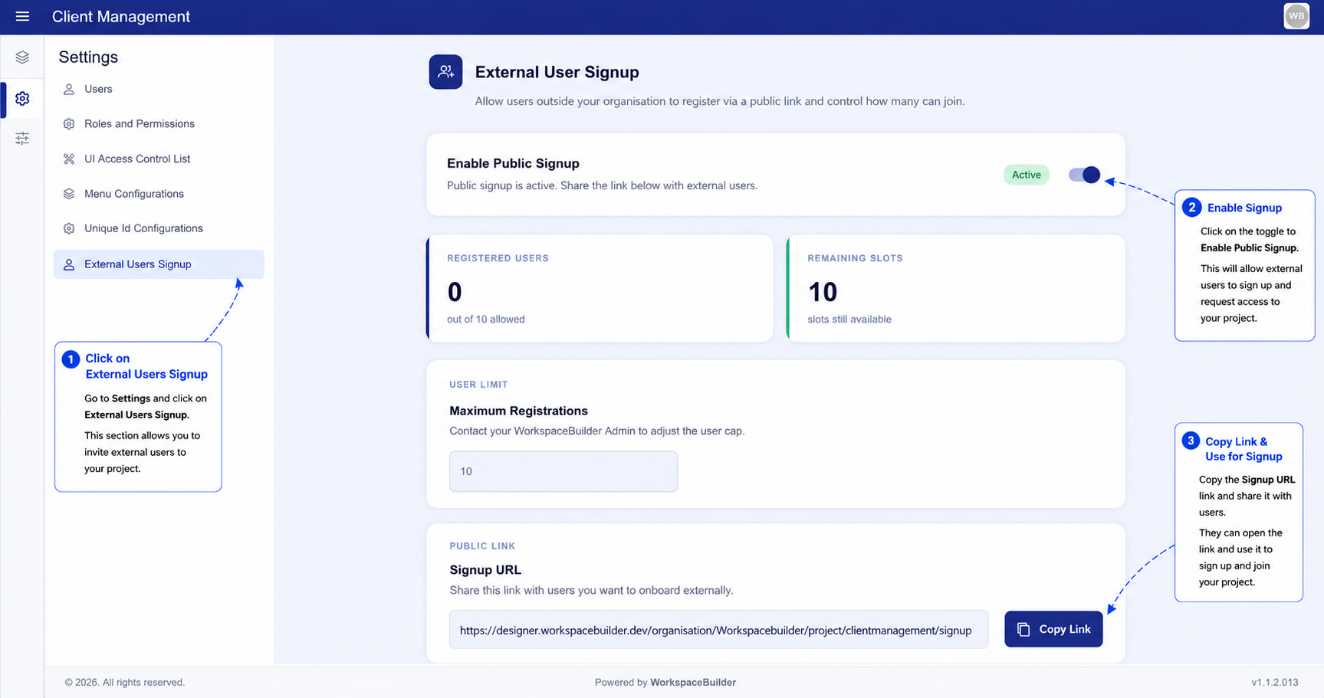
Enabling External Signup
Toggle the Enable External Signup switch to turn the feature on or off for this project.
- ON — the signup URL becomes active and new users can register through it.
- OFF — the signup URL is inactive and the registration page returns an error.
Signup URL
When external signup is enabled a unique signup URL is generated for this project:
<app-base-url>/organisation/<org-name>/project/<project-name>/signup
Use the Copy button next to the URL field to copy it to your clipboard. Share this URL with users who need to self-register.
User Limit
You can cap the number of external users who can register through this URL.
| Field | Description |
|---|---|
| User Limit | Maximum number of external accounts allowed to sign up |
| Current User Count | Live count of external users who have already registered |
Leave the limit blank to allow unlimited registrations. Once the limit is reached, new signups are blocked automatically.
Branding (Logo, Favicon, Colour)
You can customise the appearance of the signup page to match your project's branding:
| Setting | Description |
|---|---|
| Brand Colour | Primary colour applied to buttons and accents on the signup page |
| App Logo URL | URL of the logo image shown at the top of the signup form |
| Favicon URL | URL of the favicon shown in the browser tab |
Enter the URLs for your hosted images and click Save to apply.
Notes
- External users who register through the signup page are automatically assigned the default user role for the project.
- You can review and manage registered external users in Users.
- The signup page inherits the brand colour, logo, and favicon set here — not the workspace-level theme settings.