Menu Configurations
Menu Configurations control the layout style and appearance of the navigation menu that end-users see in User Mode. Changes take effect immediately after saving.
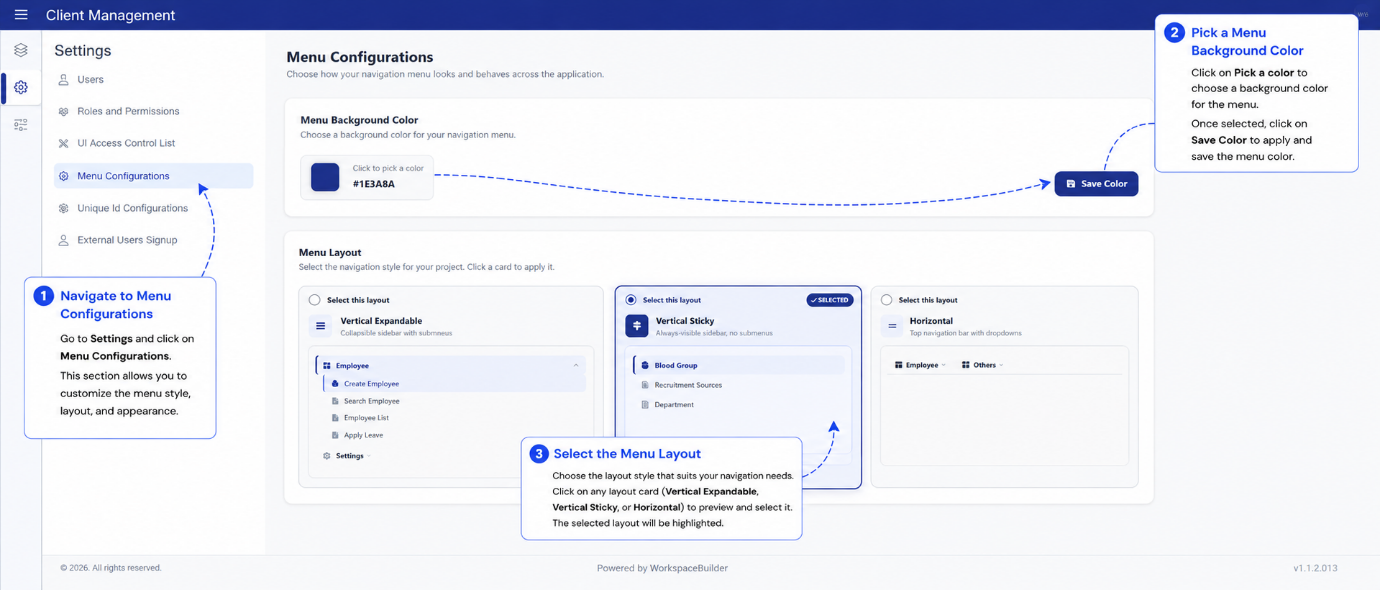
Menu Layout Types
Three layout styles are available. Select the one that best fits your project's navigation needs.
| Layout | Internal Name | Description |
|---|---|---|
| Expandable | VerticalMenuBar | A collapsible vertical sidebar. Menu groups expand and collapse on click. Best for projects with many menus. |
| Sticky | StickyMenuBar | A fixed vertical sidebar that stays visible as the user scrolls. |
| Horizontal | HorizontalMenuBar | A top navigation bar. Best for projects with a small number of top-level menus. |
Menu Background Colour
You can set a custom background colour for the menu using the colour picker. The selected colour is applied to the sidebar or top bar depending on the active layout.
Saving Changes
- Changing the layout type saves automatically as soon as you select a new option.
- Changing the background colour requires clicking Save Colour to apply.
Changes to menu configuration are reflected in User Mode immediately after saving. No form republishing is required.