Unique ID Configurations
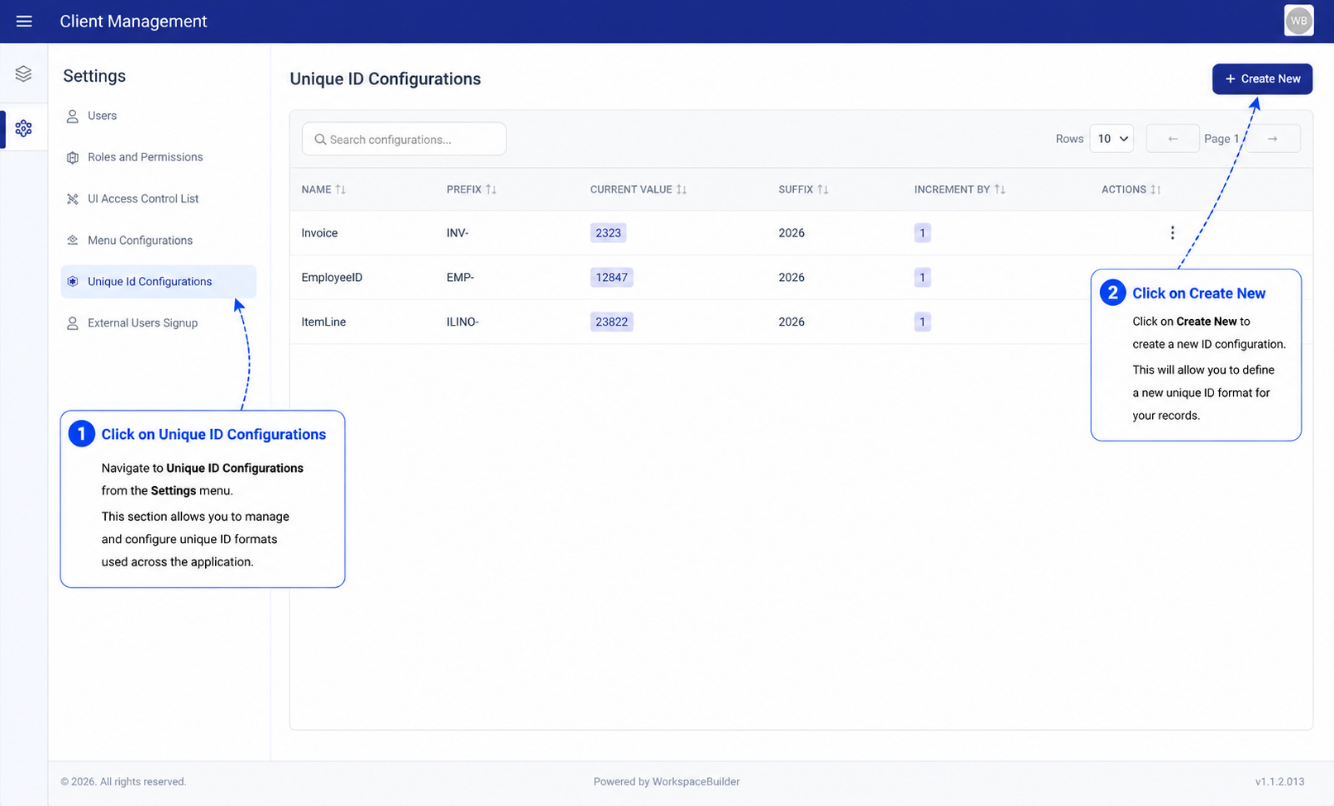
Unique ID Configurations let you define named auto-incrementing sequences that forms can reference to generate structured, predictable record identifiers — for example INV-0001, TKT-00042, or REQ-2026-001.
How It Works
Each configuration defines a counter with an optional prefix and suffix. When a form field is linked to a sequence, the next value is generated automatically on submission by combining:
<prefix><current_value><suffix>
The counter increments by the configured step after each use.
Creating a Unique ID Configuration
- Click Create.
- Fill in the fields in the modal:
| Field | Description |
|---|---|
| Name | Internal label for this sequence (e.g. invoice_id) |
| Prefix | Text prepended to the number (e.g. INV-) |
| Suffix | Text appended to the number (e.g. leave blank or -2026) |
| Current Value | The starting number for the next generated ID |
| Increment By | How much the counter increases after each use (default 1) |
- Click Save.
Example
| Setting | Value |
|---|---|
| Prefix | TKT- |
| Suffix | (empty) |
| Current Value | 100 |
| Increment By | 1 |
First generated ID: TKT-100
Second generated ID: TKT-101
Editing a Configuration
- Click the three-dot menu (⋮) on a row.
- Select Edit.
- Update any field and click Save.
Editing the Current Value directly changes the next ID that will be issued. Use this carefully if submissions already exist.
Deleting a Configuration
- Click the three-dot menu (⋮) on a row.
- Select Delete and confirm.
Deleted sequences are deactivated (is_active = false) rather than permanently removed, preserving the history of previously issued IDs.